

WooCommerce Product Feed Automation – Case Study
Custom WooCommerce product feed automation developed in WordPress and PHP to generate XML feeds for different markets, languages and external platforms while applying configurable business rules to product titles, categories, attributes and commercial information.
This project was created for an ecommerce catalog that needed to distribute product information to external channels without manually modifying hundreds of products inside WooCommerce.
The solution separates the original WooCommerce catalog from the commercial logic required by each feed, allowing the same product data to be transformed differently according to market, language and platform requirements.
The Challenge
The WooCommerce catalog needed to generate different product feeds depending on the target market and language.
The main problem was that the information stored in WooCommerce did not always match the structure or commercial requirements expected by each external platform.
Some products also required specific rules for information such as:
- Product titles
- Categories
- Commercial attributes
- Gender-related attributes
- Additional product information
- Language-specific content
Managing those differences manually inside every WooCommerce product would have created unnecessary duplication and made future changes difficult to maintain.
The business needed a system capable of adapting catalog information dynamically without constantly changing the original product data.
The Solution
I developed a custom solution in WordPress and PHP that processes the WooCommerce catalog and automatically generates XML product feeds using configurable rules.
The system can:
- Process WooCommerce products automatically
- Generate independent feeds for different markets
- Apply dynamic rules to product titles
- Use categories and attributes to enrich feed information
- Apply different rules according to language
- Assign commercial attributes based on product category and characteristics
- Keep original WooCommerce information separate from feed-specific logic
- Generate XML files compatible with external platforms
- Allow future adjustments without manually editing hundreds of products
The result is a dedicated automation layer between the WooCommerce catalog and the systems consuming the product feeds.
Automated WooCommerce Catalog Processing
Automated WooCommerce Catalog Processing
Instead of editing each product individually for every external destination, the system processes the existing WooCommerce catalog automatically.
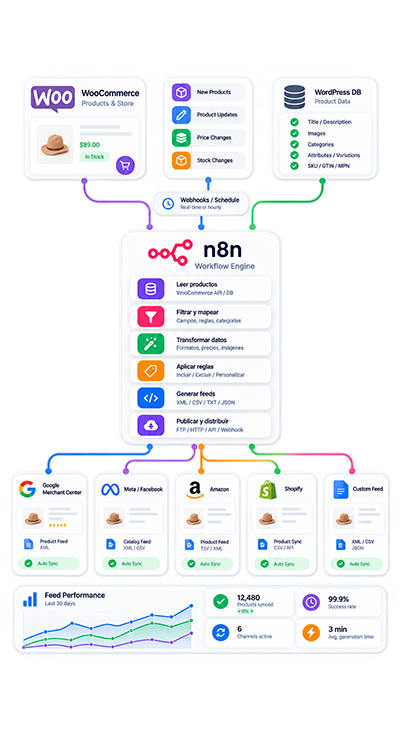
A simplified flow can be represented as:
WooCommerce product → retrieve product data → evaluate categories and attributes → apply configured rules → transform commercial information → generate XML feed.
This means the ecommerce catalog remains the primary source of product information while the automation determines how that information should be represented in each feed.
Multiple Product Feeds From One Catalog
One of the main requirements was supporting different markets without duplicating the product catalog.
The same WooCommerce product may need different information depending on where the feed will be used.
The system can therefore generate independent feeds while continuing to use the same underlying WooCommerce catalog.
Conceptually:
WooCommerce catalog → Feed A rules → XML Feed A
WooCommerce catalog → Feed B rules → XML Feed B
This keeps the source catalog centralized while allowing different commercial representations for different destinations.
Dynamic Product Title Rules
Product titles stored in WooCommerce are not always the exact titles required for external feeds.
The custom solution can apply rules that modify or enrich feed titles without changing the original WooCommerce product name.
This is useful when commercial feeds need additional information derived from:
- Product category
- Product characteristics
- Existing attributes
- Feed-specific rules
- Language requirements
The important distinction is that the transformation occurs during feed generation rather than by permanently rewriting the product inside WooCommerce.
Categories & Product Attributes
WooCommerce categories and attributes can provide useful context for feed generation.
The system can use that structured information as part of its decision logic.
For example, a product’s category or characteristics may determine:
- Which commercial attribute should be assigned
- Whether specific information should be added
- Which title rule should apply
- How the product should be classified in the generated feed
This makes the feed more adaptable than simply exporting the raw WooCommerce database values.
Language-Specific Feed Rules
The project also needed different rules depending on language.
Instead of mixing all language-specific transformations into the WooCommerce product itself, the automation keeps those rules inside the feed-generation logic.
This allows different feeds to use appropriate commercial information while preserving the original catalog structure.
The approach is particularly useful when the same products need to be distributed across different markets or language contexts.
Commercial Attribute Assignment
Some external feeds require attributes that may not correspond directly to the information stored in the original WooCommerce product.
The system can derive or assign commercial attributes according to:
- Product categories
- Existing characteristics
- Configured business rules
This creates a controlled transformation layer between internal catalog data and external feed requirements.
Original WooCommerce Data Remains Separate
A key architectural decision was keeping the original WooCommerce information separate from the logic required by each product feed.
This avoids turning the ecommerce catalog into a collection of platform-specific modifications.
Instead:
WooCommerce stores the product → feed rules determine how the product is represented externally.
This separation makes the system easier to maintain when requirements change.
XML Feed Generation
After processing the catalog and applying the corresponding rules, the system generates XML files that can be consumed by external platforms.
The XML output is created automatically from the processed WooCommerce data.
This removes the need to manually build product files or repeatedly export and modify spreadsheets whenever the catalog changes.
Configurable Business Rules
The system was designed around configurable rules rather than hardcoded changes to individual products.
These rules determine how information should be transformed according to the needs of each feed.
Depending on the requirement, the logic can evaluate elements such as:
- Categories
- Attributes
- Language
- Product characteristics
- Commercial classification
- Title requirements
This allows changes to be made at the rule level instead of editing many individual WooCommerce products.
Easier Future Adjustments
Product-feed requirements can evolve.
A platform may require different attributes, a business may enter another market or a new commercial rule may need to be applied to part of the catalog.
Because the transformation logic is separated from the original products, future adjustments can be made without manually modifying hundreds of WooCommerce entries.
That was one of the main business benefits of the implementation.
Reduced Manual Catalog Work
The automation reduced the amount of repetitive work required to manage large product catalogs for multiple external channels.
Instead of duplicating products or constantly editing the source catalog, the business can maintain WooCommerce as the primary product source while adapting the exported information through automated feed rules.
This makes the process more scalable and easier to maintain as catalog or channel requirements change.
Designed Around Real Ecommerce Requirements
The solution was not simply an XML export script.
The main requirement was translating real ecommerce catalog information into different commercial representations according to external requirements.
The process involved:
WooCommerce catalog → structured product data → classification rules → language rules → commercial attributes → feed-specific transformation → XML generation.
This type of workflow is useful when the source data is correct for the ecommerce store but needs additional logic before being sent elsewhere.
My Role in the Project
I was responsible for the technical implementation of the solution, including:
- Requirements analysis
- Design of business rules
- PHP development for WordPress and WooCommerce
- XML generation
- Classification logic
- Testing
- Debugging
- Subsequent evolution of the tool
The project combined ecommerce development, catalog processing and configurable business logic rather than relying on a generic feed export.
Technical Architecture
The solution is built around several connected layers.
WooCommerce
Acts as the primary source of product and catalog information.
WordPress & PHP
Provide the environment and custom development layer where catalog processing and feed-generation logic are implemented.
Product Classification Logic
Evaluates categories, attributes and product characteristics to determine which business rules should apply.
Feed Rules
Transform product information according to market, language and commercial requirements.
XML Generation
Produces the final product feeds used by external platforms.
This architecture keeps catalog management and feed transformation as separate responsibilities.
Reliable & Maintainable Feed Automation
A large catalog can become difficult to manage if every external requirement requires manually changing products.
The custom feed architecture avoids that approach.
Instead, transformations are centralized so the business can maintain:
- One primary WooCommerce catalog
- Separate rules for different feeds
- Consistent classification logic
- Repeatable XML generation
- Easier future changes
The objective is not simply to automate an export, but to create a maintainable layer between the ecommerce store and external channels.
The Result
The project produced a custom WooCommerce feed-generation system capable of processing the catalog automatically and generating different XML feeds using configurable rules.
The system provides a structured way to:
- Reuse the existing WooCommerce catalog
- Generate different feeds for different markets
- Apply dynamic title rules
- Use categories and attributes in feed logic
- Support language-specific rules
- Assign commercial attributes
- Keep external requirements separate from original WooCommerce data
- Generate XML feeds automatically
- Make future adjustments centrally
The result is a more flexible product-distribution process with less dependence on manual catalog editing.
What This Project Demonstrates
This case study demonstrates practical experience with:
- WordPress
- WooCommerce
- PHP
- XML
- Product feed automation
- Ecommerce catalog processing
- Dynamic business rules
- Product classification
- Category and attribute logic
- Multimarket feed generation
- Multilanguage feed rules
- Custom ecommerce development
It also demonstrates an important architectural principle: the information needed by an external platform does not necessarily have to be stored permanently inside the original ecommerce product.
A transformation layer can adapt that information while preserving the source catalog.
Related Services
WordPress & WooCommerce Automation with n8n
Custom Development for WordPress, Shopify & Internal Systems
Need Custom WooCommerce Product Feed Automation?
If your WooCommerce catalog needs to send product information to external platforms and those destinations require different titles, attributes, categories, languages or commercial rules, a standard export may not be enough.
I can review:
- Your current WooCommerce catalog
- Existing product categories and attributes
- Required feed structure
- Markets and languages
- Product classification rules
- Commercial attributes
- XML requirements
- Current manual adjustments
- How frequently feed requirements change
Tell me how your WooCommerce products are currently exported, which information needs to change for each destination and what parts of the process are still managed manually.
From there, I can evaluate whether a custom feed-generation solution is appropriate.
WhatsApp: +57 318 648-4818
FAQ: WooCommerce Product Feed Automation
What is WooCommerce product feed automation?
WooCommerce product feed automation processes catalog information and generates structured product feeds automatically instead of requiring products to be exported and manually adjusted each time.
Can one WooCommerce catalog generate multiple feeds?
Yes. In this project, the same WooCommerce catalog was used to generate independent feeds for different markets.
Can each feed use different product information?
Yes. Feed-specific rules can transform information without requiring the original WooCommerce product to be permanently modified.
Can product titles be changed automatically in the feed?
Yes. This implementation included dynamic rules for product titles based on the configured feed logic.
Can WooCommerce categories be used to generate feed information?
Yes. Categories can be part of the classification and business-rule logic used when generating the feed.
Can product attributes be used in feed rules?
Yes. Existing WooCommerce attributes and product characteristics can be evaluated when determining the information included in a feed.
Can different languages use different rules?
Yes. Language-specific rules were part of this implementation, allowing different feeds to adapt commercial information according to language requirements.
Can the system assign commercial attributes automatically?
Yes. The solution can apply configured rules to assign commercial attributes according to categories and product characteristics.
Does the automation modify the original WooCommerce products?
The architecture was specifically designed to keep the original WooCommerce information separate from the feed-specific transformation logic.
What format are the feeds generated in?
This project generates XML product feeds.
Can the feeds be used with external platforms?
Yes. The generated XML files were designed to be compatible with external platforms according to their required feed structure.
Can the rules be changed later?
Yes. One of the objectives of the solution was to allow future adjustments through centralized rules instead of manually editing large numbers of products.
Is this useful for large WooCommerce catalogs?
It can be particularly useful when managing many products because centralized rules reduce the amount of repetitive manual editing required across the catalog.
Does this require duplicating products for each market?
No. The project was designed to adapt the information for different feeds without duplicating the original WooCommerce products.
Can a similar system be adapted to another WooCommerce store?
Potentially yes. The feed structure, categories, attributes, languages, markets and external platform requirements need to be reviewed before defining the appropriate implementation.