

Automated Lead Capture & Follow-Up System – Case Study
Automated lead management system developed with n8n, WhatsApp Business, APIs, webhooks and PostgreSQL to capture new leads, centralize their information and manage follow-up without depending on repetitive manual tasks.
This project was designed for a business receiving leads from different external sources that needed a faster and more organized way to manage the commercial process.
Instead of treating each lead as an isolated event, the solution maintains a persistent state for every contact, allowing the automation to know what has already happened, what stage the lead is currently in and what action should occur next.
The Challenge
New leads were arriving from different sources and required a timely response.
The existing process depended heavily on manual follow-up, which created several operational problems:
- Delays in responding to new opportunities
- Lead information distributed across different places
- Repetitive administrative work
- Difficulty knowing what had already happened with each contact
- Risk of contacting the same person more than necessary
- Difficulty maintaining consistent follow-up
- Risk of opportunities being lost during the process
The solution needed to do more than simply receive a lead.
It needed to capture each contact, normalize the information, determine what should happen next and maintain a structured record throughout the commercial process.
The Solution
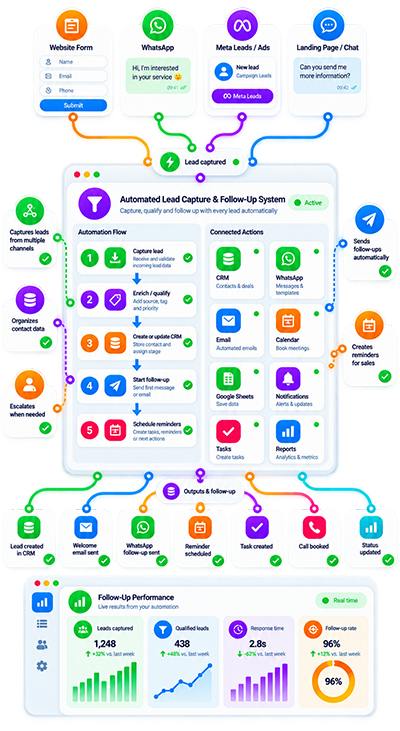
I developed an automated workflow that connects lead sources, WhatsApp Business, APIs and a database to manage the commercial process from a centralized automation layer.
The system can:
- Receive leads automatically from external platforms
- Normalize names, phone numbers, email addresses and other information
- Create and update the record for each lead
- Start WhatsApp conversations when appropriate
- Manage different states within the sales process
- Execute automatic follow-ups when there is no response
- Apply timing and contact rules
- Help prevent duplicate contacts
- Record sent messages and process results
- Integrate with APIs, webhooks and other platforms
- Route specific cases to human attention
The objective was to create a structured follow-up process rather than a collection of disconnected automations.
Automated Lead Capture
The process begins when a new lead arrives from an external source.
Instead of requiring someone to manually copy the information into another system, the workflow can receive the lead automatically and begin processing it.
A simplified flow looks like this:
New lead → receive data → normalize information → create or update lead record → determine current state → execute the appropriate next action.
This creates a consistent entry point for leads regardless of the actions that need to happen afterward.
Data Normalization
Information from different lead sources is not always delivered in exactly the same format.
Before using the data inside the sales process, the automation can normalize relevant fields such as:
- Name
- Phone number
- Email address
- Other available lead information
This creates a cleaner and more consistent record for subsequent workflow steps.
Normalization is especially important when several external systems participate in the same process because downstream actions should not depend on inconsistent formatting.
Centralized Lead Records
Each lead receives a structured record that can be created and updated as the process progresses.
The record gives the automation a reference point for understanding what has already occurred.
Instead of processing every incoming event without history, the workflow can work with the current state of the lead.
This supports a more controlled process where future actions depend on existing information rather than starting from zero each time.
Persistent Lead State
One of the key elements of the project is persistent state management.
Each lead maintains information that allows the system to determine:
- What has already happened
- What stage the lead is currently in
- What action has already been executed
- What should happen next
This avoids treating each workflow execution as an isolated event.
A process may therefore continue like this:
Lead captured → initial action → waiting for response → follow-up required → next state → human attention or continued automation.
Persistent state makes the follow-up process more consistent, measurable and controlled.
WhatsApp Conversation Initiation
When the commercial process requires it, the workflow can initiate the corresponding conversation through WhatsApp Business.
WhatsApp becomes part of the broader lead-management process rather than operating as an independent communication channel.
The workflow can determine whether a lead is in the appropriate state for contact before continuing with the corresponding action.
This helps keep communication aligned with the rules defined for the process.
Automated Follow-Up
A lead does not always respond to the first contact.
The system was designed to manage follow-up when no response is received.
Rather than requiring someone to manually review every pending conversation, the workflow can use the lead’s state and timing rules to determine whether another action is appropriate.
A simplified sequence may look like:
Initial contact → wait according to defined rule → check lead state → no response → execute follow-up → update state.
The exact behavior is governed by the business rules defined for the process.
Timing & Contact Rules
Automated follow-up needs controls.
The purpose is not to repeatedly contact a lead without context, but to apply defined rules to determine whether another interaction should occur.
The automation can use timing and state information to control the process and help prevent duplicate or inappropriate contact.
This is an important distinction between a structured lead workflow and a simple scheduled message sequence.
Duplicate Contact Prevention
When multiple systems and workflow executions are involved, the same lead should not accidentally enter the same process several times.
The automation uses the existing lead record, state and process rules to help control duplicate actions.
This is especially important when:
- Leads can arrive from external platforms
- Webhooks can generate events
- Follow-up actions run later
- Multiple workflow stages interact with the same contact
The goal is to maintain one coherent commercial process for each lead.
Lead Status Management
Different leads can be at different stages of the process.
The system manages states so automation logic can behave according to the current situation.
For example, the workflow may need to distinguish between a recently captured lead, a lead awaiting a response, a contact requiring follow-up or a case that should be reviewed by a person.
The exact states depend on the commercial workflow being implemented.
Message & Process Logging
The system records sent messages and relevant process results.
This provides traceability around what the automation has done and helps avoid relying only on the current execution.
Depending on the process, these records can help answer operational questions such as:
- Was an action already executed?
- Was a message already sent?
- What happened during the previous step?
- What should the workflow do next?
This makes automated follow-up easier to review and maintain.
APIs & Webhooks
APIs and webhooks allow the lead-management workflow to communicate with external platforms.
They can be used to:
- Receive new lead events
- Exchange information between systems
- Trigger workflow actions
- Update external platforms
- Receive status changes
- Connect additional business tools
n8n acts as the orchestration layer that coordinates those events with the persistent lead information and commercial logic.
PostgreSQL for Persistent Data
PostgreSQL is used as part of the architecture to maintain structured information and persistent lead states.
This gives the workflow a reliable source of information beyond a single n8n execution.
The database supports continuity throughout a process that may span different events and follow-up moments.
At a high level:
External lead source → n8n → normalization and business rules → PostgreSQL lead state → WhatsApp/API action → updated state → future follow-up.
This architecture makes it possible to build a process that continues over time instead of ending after the first workflow execution.
Human Handoff
Not every situation should remain automated.
The system can route specific cases to human attention when the process requires intervention.
This creates a hybrid workflow:
Automation manages structured and repetitive actions → selected cases are transferred for human review or attention.
Human involvement therefore remains part of the architecture instead of being treated as an exception outside the system.
Designed Around the Commercial Process
The automation was built around the actual lead-management workflow rather than around a specific tool.
The process analysis considered:
- How leads arrive
- Which information is received
- How that information should be normalized
- What happens after a new lead is created
- Which states need to be tracked
- When WhatsApp communication should occur
- When follow-up is required
- How timing rules should behave
- How duplicate actions should be controlled
- When human intervention is appropriate
The technology supports the process rather than forcing the process to adapt to a generic automation.
My Role in the Project
I was responsible for the technical implementation of the solution, including:
- Analysis of the commercial process
- Automation logic design
- Integration of lead sources
- n8n workflow development
- WhatsApp Business integration
- Lead-state management
- Database implementation
- Follow-up rules
- Testing
- Debugging
The project required coordinating multiple systems while maintaining continuity throughout the lead lifecycle.
Technical Architecture
The solution combines several components with different responsibilities.
Lead Sources
External platforms generate new leads and provide the information that begins the workflow.
n8n
Coordinates workflow execution, normalization, business rules, states, integrations and follow-up actions.
WhatsApp Business
Provides the communication channel used when the process requires a WhatsApp conversation.
PostgreSQL
Stores persistent lead information and states so the process can continue across multiple events.
APIs & Webhooks
Allow the workflow to communicate with external platforms and react to events from connected systems.
This separation makes it easier to keep the process structured and maintainable.
Reliable & Controlled Follow-Up
Follow-up automation should not simply mean sending messages on a timer.
The system needs to know:
- Whether the lead still requires follow-up
- What happened previously
- Whether another message has already been sent
- Which state the lead is currently in
- Whether a waiting period has been completed
- Whether human attention is required
That is why persistent state and process rules are central to the architecture.
The workflow can determine the next action based on the current situation rather than executing follow-up blindly.
The Result
The solution created a centralized automated process for capturing and managing new leads.
The system can:
- Receive new leads automatically
- Normalize contact information
- Maintain a structured lead record
- Start WhatsApp conversations when required
- Manage commercial states
- Execute follow-up when no response is received
- Apply timing and contact rules
- Help prevent duplicate actions
- Record messages and process results
- Exchange information through APIs and webhooks
- Escalate selected cases to human attention
The result is a more structured lead-management process that reduces dependence on repetitive manual follow-up while preserving control over what happens with each contact.
What This Project Demonstrates
This case study demonstrates practical experience combining:
- Lead capture automation
- Lead follow-up automation
- n8n workflow orchestration
- WhatsApp Business
- CRM-style workflows
- Persistent lead states
- PostgreSQL
- APIs
- Webhooks
- Data normalization
- Duplicate prevention
- Human handoff
- Multi-step business processes
It also demonstrates why lead automation often requires more than connecting a form to a messaging platform.
The system needs to understand where each lead is within the process and what should happen next.
Related Services
Sales Automation & Lead Follow-Up
Need an Automated Lead Capture & Follow-Up System?
Tell me how leads currently enter your business and where manual follow-up is still required.
If leads arrive through multiple channels and your team still needs to copy information, review pending contacts, send follow-ups manually or check several platforms to understand what happened with each opportunity, the process may be a good candidate for automation.
I can review:
- Where leads currently arrive
- What information each source provides
- How contacts are stored
- Which states exist in the sales process
- When WhatsApp communication should begin
- Follow-up timing and rules
- External APIs and platforms
- Database requirements
- Duplicate prevention requirements
- Human handoff conditions
Tell me how leads currently enter your business, what happens after they arrive and where manual follow-up is still required.
From there, I can evaluate the most practical architecture for automating the process.
WhatsApp: +57 318 648-4818
FAQ: Automated Lead Capture & Follow-Up System
What is an automated lead capture system?
An automated lead capture system receives lead information from connected sources and processes it without requiring someone to manually transfer the data into the next stage of the sales process.
Can leads from different platforms be managed in one workflow?
Yes. This project was designed to receive leads from external platforms and manage them through a centralized automation process.
Can lead information be normalized automatically?
Yes. The workflow can normalize information such as names, phone numbers, email addresses and other available fields before using the data in subsequent steps.
Can the system create and update a record for each lead?
Yes. A structured lead record is created and updated so the workflow can maintain information about each contact throughout the process.
Can the workflow start WhatsApp conversations automatically?
Yes. When the defined business rules indicate that contact is appropriate, the workflow can initiate the corresponding process through WhatsApp Business.
Can follow-up be automated when a lead does not respond?
Yes. Automated follow-up was part of this implementation. The workflow uses lead state and timing rules to determine when another action should occur.
How does the system know whether a lead has already been contacted?
The workflow maintains persistent information about each lead, allowing it to use previous actions and the current state when deciding what should happen next.
Can duplicate contacts be prevented?
The workflow can use lead records, states and process rules to help prevent duplicate actions or repeated contact when it is not appropriate.
Why does the system use persistent lead states?
Persistent states allow the automation to know what happened previously and what action is expected next instead of treating every workflow execution as an unrelated event.
Can the system record messages and process results?
Yes. Recording sent messages and relevant process results was part of the implemented workflow.
Can it connect with APIs and webhooks?
Yes. APIs and webhooks are part of the architecture and allow the system to receive events and exchange information with external platforms.
Why is PostgreSQL used?
PostgreSQL stores structured information and persistent lead states that need to remain available across different workflow executions and follow-up stages.
Can a lead be transferred to a person?
Yes. Selected cases can be routed to human attention when the workflow determines that manual intervention is required.
Does an automated follow-up system replace a CRM?
Not necessarily. The system can participate in CRM-style workflows and integrate with other platforms. Whether a separate CRM is required depends on the specific business architecture.
Can a similar system be adapted to another sales process?
Potentially yes. The workflow, states, timing rules, data sources, communication channels and integrations need to be designed around the specific commercial process of each business.