

WordPress & WooCommerce Automation with n8n
Connect your WordPress or WooCommerce website with CRM systems, APIs, databases and business tools using reliable n8n automation.
I build custom workflows that move information automatically between your website and the systems your business already uses, helping reduce repetitive tasks, manual data entry and disconnected processes.
From WordPress forms and lead capture to WooCommerce orders, customer data, notifications and external APIs, each automation is designed around the way your business actually works.
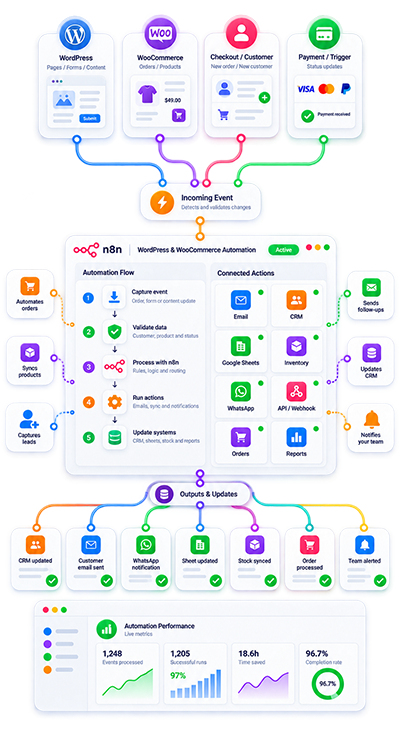
WordPress & WooCommerce Automation Overview
WordPress and WooCommerce often sit at the center of important business processes: customers complete forms, place orders, update information, request services or trigger actions that need to continue in other systems.
Without automation, that information may need to be copied manually into a CRM, spreadsheet, database, email platform or another application.
Using n8n, I connect these systems so events in WordPress or WooCommerce can automatically trigger the appropriate business workflow.
The goal is not simply to connect applications, but to create a controlled process where information moves correctly from one step to the next.
What Exactly Do I Automate?
Depending on the project, I can build workflows around:
- WordPress forms and lead capture
- WooCommerce orders and customer information
- CRM workflows and lead management
- API and webhook integrations
- Google Sheets and database synchronization
- Email notifications and automated follow-ups
- Customer and order data synchronization
- Connections with external business platforms
- AI-powered actions when the process requires them
These are the same core automation areas reflected in my WordPress + n8n service offering.
v
Three Types of WordPress & WooCommerce Automation
Lead & Customer Automation
Connect forms, registrations and customer information with CRM systems, databases, spreadsheets and follow-up processes.
Examples include:
- Lead capture
- Contact synchronization
- Lead registration
- Customer data updates
- Automated notifications
- Follow-up workflows
WooCommerce Order Automation
Use WooCommerce events and data to trigger processes in external systems.
Examples include:
- Order synchronization
- Customer data processing
- Internal notifications
- Database updates
- External API actions
- Order-related workflows
API & Cross-System Automation
Connect WordPress and WooCommerce with applications that do not work together natively.
Examples include:
- CRM platforms
- Google Sheets
- Databases
- Email systems
- External APIs
- Internal business tools
- Custom applications
Benefits of WordPress Automation with n8n
Less Repetitive Manual Work
More Consistent Data Handling
Better Connection Between Business Tools
Processes That Can Evolve
Ready for Real Business Processes
Conditional Logic
An automation does not have to perform the same action every time.
The workflow can evaluate information and decide what happens next based on conditions defined for the process.
Data Synchronization
Information can be transferred between WordPress, WooCommerce and external systems while maintaining the required structure for each destination.
Multiple Connected Actions
One website event can trigger several controlled steps across different platforms.
For example:
Form submission → CRM → database → email notification → follow-up action.
WordPress Lead Automation
A website form can be much more than an email notification.
When a visitor submits information, n8n can receive the data and continue the process automatically.
Depending on the workflow, this can include:
- Processing submitted fields
- Sending information to a CRM
- Updating a spreadsheet
- Creating or updating database records
- Sending internal notifications
- Starting a follow-up workflow
- Triggering additional API actions
This is particularly useful when lead information currently needs to be transferred manually between different tools.
WooCommerce Order & Customer Automation
WooCommerce produces useful operational information around orders and customers.
That information can become the starting point for automated workflows.
For example:
Order created → retrieve order and customer data → send information to another system → update internal records → notify the appropriate team.
The exact workflow depends on the systems involved and the business rules that need to be respected.
API & Webhook Integrations
APIs and webhooks make it possible to connect WordPress or WooCommerce with external platforms even when there is no ready-made plugin for the exact process.
A workflow can:
- Receive webhook events
- Send API requests
- Retrieve external information
- Transform data
- Apply conditions
- Update other systems
- Trigger additional actions
This allows WordPress and WooCommerce to participate in processes that extend well beyond the website itself.
Designed for Reliable Automation
Business automation should not depend on a chain of actions that works only under ideal conditions.
I focus on clear workflow logic, accurate data handling and error prevention so the automation can be maintained and expanded as requirements evolve. This reliability focus is also part of the n8n service I currently offer for WordPress and WooCommerce.
Depending on the workflow, the implementation may need to consider:
- Validation of incoming data
- Conditional processing
- Duplicate prevention
- Error handling
- Controlled retries
- Clear workflow structure
- Logging or traceability
- Safe handling of API responses
The exact controls depend on the systems and the importance of the process being automated.
Stable and Controlled Technical Development
An automation should be understandable after it has been deployed.
I avoid building unnecessarily complicated workflows when a simpler process can solve the requirement.
The objective is to create automation that is:
- Clear
- Maintainable
- Adaptable
- Connected to the actual business process
- Structured around the systems being used
This makes future adjustments easier when the website, API or operational process changes.

Why Work With Me?
Our Process
Process Analysis
First, I review how the process currently works and identify:
- What triggers the process
- What information is available
- Which tasks are manual
- Which systems are involved
- What should happen automatically
- Where human intervention is still needed
Technical Mapping
WordPress or WooCommerce event, required data, destination systems, APIs, authentication, business rules, expected actions, errors and final result.
Workflow Development
I build the n8n workflow and configure the required connections.
Depending on the project, this may involve:
- WordPress
- WooCommerce
- APIs
- Webhooks
- CRM systems
- Google Sheets
- Databases
- Email platforms
- Other business tools
Validation & Testing
Triggers, data mapping, conditions, API responses, synchronization, error scenarios, duplicate handling and complete workflow execution.
Deployment & Review
The completed automation is reviewed as an end-to-end process so the configured systems and actions work together as intended.
Existing n8n Workflow Review
You do not necessarily need to start from scratch.
If you already have a WordPress or WooCommerce automation in n8n, I can review an existing workflow to help identify problems such as:
- Incorrect data mapping
- Broken API connections
- Incomplete conditions
- Workflow errors
- Synchronization problems
- Repetitive manual steps that remain in the process
- Logic that has become difficult to maintain
The best approach depends on the current implementation.
Ongoing Automation Support
Business systems change over time.
A CRM may change its API, WooCommerce may require a different data structure, a new application may need to be connected or the business process itself may evolve.
Existing workflows can be reviewed and extended when new requirements appear.
The objective is to maintain a useful automation layer rather than treating every new requirement as a completely separate system.
What Can Be Monitored?
Depending on the workflow, useful operational information may include:
- Workflow executions
- Successful and failed actions
- API responses
- Order or lead events
- Synchronization activity
- Error conditions
- Retry attempts
- Processing status
What should be monitored depends on the importance and complexity of the automated process.
What You Can Achieve
A properly designed WordPress or WooCommerce automation can help:
- Reduce manual data transfer
- Connect website activity with internal systems
- Improve consistency between platforms
- Trigger follow-up actions automatically
- Keep customer or order information synchronized
- Reduce repetitive administrative work
- Create clearer operational workflows
These are operational benefits rather than guaranteed commercial results; the actual impact depends on the process being automated.
What You Receive
Depending on the agreed scope, a project can include:
- n8n workflow development
- WordPress or WooCommerce integration
- API connections
- Webhook configuration
- Data mapping
- Conditional workflow logic
- CRM or database integration
- Notifications and follow-up actions
- Testing of the complete process
- Review of the configured automation
Hosting, n8n hosting, premium WordPress plugins, API usage, AI usage and third-party subscriptions are normally separate from the implementation unless explicitly included in the project scope.
Common Problems This Service Can Solve
WordPress Leads Are Copied Manually
Form submissions can be automatically sent to the appropriate CRM, spreadsheet, database or business system.
WooCommerce Orders Need to Reach Another Platform
Order and customer information can be processed and synchronized automatically.
Systems Do Not Communicate With Each Other
n8n can act as the integration layer between WordPress, WooCommerce and external APIs.
Staff Repeat the Same Administrative Tasks
Defined actions can be triggered automatically when relevant website events occur.
Existing Automations Are Difficult to Maintain
The workflow can be reviewed and reorganized around clearer logic and data handling.
Start Your WordPress & WooCommerce Automation Project
Tell me what currently happens in WordPress or WooCommerce.
If your website is generating information that your team still needs to copy, process or transfer manually, there may be an opportunity to automate that workflow.
Tell me what currently happens in WordPress or WooCommerce, which systems are involved and what you need to happen automatically.
I can review the process and determine the most practical way to implement it with n8n.
WhatsApp: +57 318 648-4818
WordPress, WooCommerce & n8n Integration Services
WordPress and WooCommerce can become much more useful when they are connected to the systems that run the rest of the business.
With n8n automation, website events can trigger structured processes involving CRM platforms, APIs, databases, Google Sheets, notifications and other business applications.
I develop WordPress and WooCommerce automation around real operational requirements, with an emphasis on clear workflow logic, reliable data handling and integrations that can be maintained as the business evolves.
FAQ: WordPress & WooCommerce Automation with n8n
What can be automated between WordPress and n8n?
WordPress forms, lead capture, customer information, notifications, API actions, CRM processes, database updates and other website events can be incorporated into n8n workflows depending on the available integrations and project requirements.
Can WooCommerce orders be automated with n8n?
Yes. WooCommerce order and customer data can be used to trigger workflows that synchronize information, update external systems, send notifications or perform other defined actions.
Can WordPress forms send leads directly to a CRM?
Yes. A form submission can trigger an n8n workflow that processes the information and sends it to a CRM or another destination configured for the process.
Can you connect WordPress with external APIs?
Yes. n8n can be used to send and receive information through APIs when the external platform provides the required access.
Can you use webhooks with WordPress and WooCommerce?
Yes. Webhooks can be used to trigger workflows when relevant events occur, depending on the functionality available in WordPress, WooCommerce or the system being connected.
Can WordPress data be synchronized with Google Sheets?
Yes. Google Sheets can be incorporated into workflows for data synchronization, operational records or other business processes when appropriate.
Can you connect WordPress or WooCommerce with a database?
Yes. Database integration can be included when the technical architecture and access requirements support it.
Can AI be added to a WordPress automation?
Yes, when the process genuinely requires it. AI-powered actions can be incorporated into the workflow for tasks that benefit from interpretation, classification or other model-based processing.
Can you automate customer follow-up?
Yes. Website or WooCommerce events can trigger notifications or follow-up actions according to the business rules defined for the workflow.
Can you work with an existing n8n workflow?
Yes. Existing workflows can be reviewed, troubleshot or improved instead of rebuilding everything from scratch when that is the most practical approach.
Do I need to have n8n installed already?
Not necessarily. The appropriate setup depends on the project and existing infrastructure. Hosting and n8n hosting should be defined separately from the workflow implementation.
Are n8n hosting and third-party subscriptions included?
Not normally. Hosting, n8n hosting, premium WordPress plugins, API usage, AI usage and third-party subscriptions are separate unless explicitly included in the agreed scope.
Can several business systems be connected in one workflow?
Yes. A workflow can involve several applications, APIs or data sources when the process requires them, although complexity and scope should be reviewed before implementation.
Can the automation include error handling?
Yes. Depending on the workflow, error handling, validation, retries and other controls can be incorporated to improve reliability.
How do I know if my WordPress process should be automated?
A good candidate is usually a repetitive process where information moves between WordPress or WooCommerce and another system, especially when staff currently copy data manually, repeat the same steps or need to monitor several platforms.