

Automated Workflow Development with Webhooks, APIs and AI
Connect events, systems, and artificial intelligence to create processes that run automatically
Many companies use applications, forms, business platforms, databases, and external services that need to exchange information constantly.
The problem appears when each system operates separately and someone has to manually move data, check events, execute actions, or decide what should happen next.
That is where automated workflows with webhooks, APIs, and artificial intelligence come in.
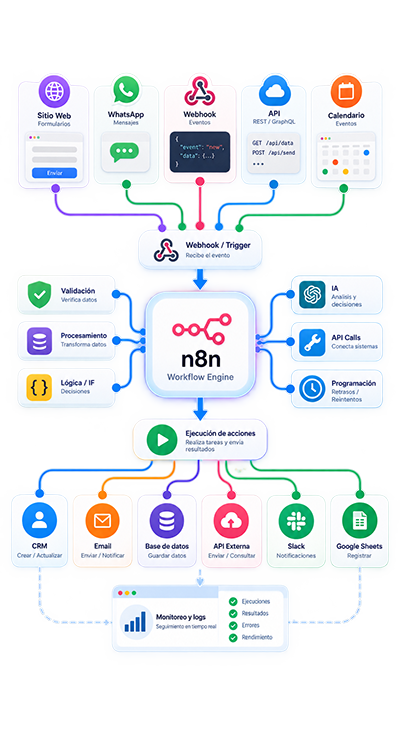
I design and develop processes capable of receiving events in real time, querying different systems, processing information, applying rules, using artificial intelligence, and automatically executing the necessary actions.
From a specific integration to complex workflows involving multiple applications, databases, external services, and automated decisions.
Connected, event-driven processes designed to execute actions automatically and in a controlled way.
Service Overview
What exactly do I do?
I analyze processes where different systems need to exchange information or react automatically when an event occurs.
I can develop, among other things:
- Workflows triggered by webhooks
- Integrations between different APIs
- Automatic event processing
- Information synchronization between systems
- Database queries and updates
- Data transformation and validation
- Automatic form processing
- Order, customer, or payment workflows
- Sales and operational processes
- Automation triggered by external events
- Artificial intelligence integration
- Automatic information classification
- Action execution according to rules
- Automations involving multiple platforms
- Alerts for errors or specific conditions
The goal is not to connect systems simply because an API exists.
It is to identify what event should start the process, what information each system needs, and what actions should be executed automatically afterward.
Why use webhooks, APIs, and AI within the same workflow?
Each technology performs a different role within an automation.
Webhooks make it possible to detect events, APIs allow information to be retrieved or modified, and artificial intelligence can interpret data when traditional rules are not enough.
The workflows I develop can be:
- Automated, reacting when an event occurs
- Integrated, connecting multiple applications and services
- Customized, according to specific business logic
- Controlled, through rules, validations, and error handling
- Measurable, with execution and result tracking
- Scalable, allowing new systems or actions to be added
This makes it possible to build processes that are much more complete than an isolated integration between two applications.
Automated Workflows: Events, Data, and Actions within the Same Process
A well-designed workflow is not simply about connecting one system to another.
It means defining:
what starts the process, what information is received, which systems need to be queried, what decisions need to be made, and what actions should be executed as a result.
I can develop workflows that receive an event, validate information, query APIs, transform data, use artificial intelligence when necessary, and execute actions across one or multiple systems.
Everything within an organized and controllable architecture.
What Type of Automated Workflows Do I Develop?
Event-Based and Webhook Workflows
- Form submissions
- New orders
- Status changes
- New customers or leads
- Payment confirmations
- Incoming messages
- Record updates
- Events from external applications
API Integrations and Processing
- Information retrieval
- Record creation
- Data updates
- Platform synchronization
- Information validation
- Data structure transformation
- Action execution
- Coordination of multiple services
Advanced Workflows with AI
- Automatic classification
- Text analysis
- Information extraction
- Intent identification
- Document processing
- Structured data generation
- Context-assisted decisions
- Automation with n8n
- Databases
- Multiple APIs and webhooks
Benefits of Developing Automated Workflows
Immediate Response to Events
Better Connected Systems
Less Repetitive Work
Greater Operational Control
Ready for Real Business Processes
Webhooks and Real-Time Execution
Webhooks allow an application to automatically notify another system when an event occurs.
For example:
- a form is submitted
- an order is created
- a payment status changes
- a message arrives
- a customer is registered
- a lead is updated
- a booking is completed
- an external event occurs
The workflow receives the information and can immediately begin the corresponding process.
APIs and System Connections
APIs make it possible to retrieve information or execute actions within other platforms.
I can work with:
- REST APIs
- API Key authentication
- OAuth
- Access tokens
- Custom endpoints
- Internal system APIs
- External services
- Custom-developed applications
This makes it possible to build processes that use information from multiple systems within the same execution.
Multi-Step Processes
A workflow can coordinate several consecutive actions.
For example:
- receive a webhook
- validate the information
- query an API
- search for a record
- process data
- use artificial intelligence
- update another system
- send a notification
- record the result
Each step can depend on the result obtained in the previous stage.
Data, Transformation, and Information Synchronization
Systems do not always use the same data structure.
For that reason, an important part of an automated workflow is preparing information correctly before sending it to another platform.
I can develop processes to:
- Validate fields
- Transform data structures
- Normalize information
- Consolidate data
- Remove duplicates
- Query existing records
- Create new records
- Update information
- Convert formats
- Synchronize different systems
- Process large numbers of records
- Record results
Depending on the project, workflows can work with PostgreSQL, MySQL, CRM systems, APIs, or other compatible sources.
Artificial Intelligence within Automated Workflows
Artificial intelligence can be incorporated when a process requires interpreting information that cannot easily be handled through traditional rules.
Some examples include:
- Classifying a request
- Analyzing a message
- Identifying intent
- Extracting information from text
- Processing documents
- Summarizing content
- Structuring information
- Detecting categories
- Evaluating context
- Determining which route the process should follow
Artificial intelligence is used as one stage within the workflow, while important actions remain controlled through rules, data, and validations.
The goal is to combine events, APIs, automation, and AI in a practical and controlled way.
Workflows Designed for Production
A business workflow must operate reliably even when an API fails, data arrives incomplete, or an external service does not respond.
That is why I can incorporate:
Error Handling
Specific routes to manage API failures, connection problems, invalid information, or unexpected responses.
Controlled Retries
Processes that can retry specific operations while avoiding duplicate actions or records.
Data Validation
Checks before sending information, updating systems, or executing important operations.
Execution Logging
Information that makes it possible to review what happened at each stage of the workflow and simplify troubleshooting.
Alerts and Escalation
The system can generate a notification when a process fails or when a situation requires human intervention.
Stable and Controlled Technical Development
Organized Architecture
I design workflows by separating events, processing, integrations, and actions to avoid automations that become unnecessarily difficult to maintain.
Measurable Processes
Executions, events, results, and errors can be recorded to simplify process monitoring.
Architecture Ready to Grow
A well-designed workflow should allow new APIs, events, rules, or actions to be added without rebuilding the entire solution.

Why Work With Me?
I do not start with the webhook, the API, or the artificial intelligence model.
I start with the process you need to connect and automate.
Before developing a workflow, I analyze what event starts it, what information is received, which systems are involved, what decisions are necessary, and what actions should be executed automatically.
From there, I design the simplest and most reliable solution capable of solving the problem.
My approach combines webhooks, APIs, artificial intelligence, automation, databases, and business logic.
Our Process
1. Analysis of the Current Process
I review the process you need to automate, what event starts it, and which systems currently participate.
I identify:
- what starts the workflow
- what information is received
- which systems need to be queried
- what decisions are required
- what actions need to be executed
- what situations could cause errors
The result is a clear definition of the workflow that actually needs to be developed.
2. Workflow Design
I define the architecture of the solution:
Events, webhooks, data, APIs, rules, artificial intelligence, validations, expected result.
The goal is to build a workflow that is logical, controllable, and easy to maintain.
3. Development and Integration
I build the workflow and configure the necessary connections with APIs, webhooks, databases, applications, and artificial intelligence services.
I implement the logic required for each stage to process information correctly and execute the defined actions.
4. Testing and Validation
I test different scenarios before moving the workflow into production.
I verify:
webhooks, data, APIs, transformations, rules, AI results, errors, retries, executed actions, behavior in unexpected situations.
The goal is to avoid processes that only work when every system responds exactly as expected.
5. Implementation, Documentation, and Support
Once the workflow has been validated, it is deployed into production.
Depending on the project, I can include:
- basic documentation
- explanation of how it works
- execution reviews
- subsequent adjustments
- maintenance
- monitoring
- implementation of new actions
Ongoing Support and Maintenance
Automated workflows depend on APIs, external services, and platforms that can change over time.
That is why I can also provide maintenance for existing solutions.
This can include:
- Execution reviews
- Error correction
- API updates
- Webhook adjustments
- Process optimization
- Credential reviews
- Improved error handling
- Addition of new actions
- Log analysis
- Performance adjustments
The goal is to ensure workflows continue operating reliably even when the systems they integrate with change.
Metrics That Can Be Monitored
Depending on the workflow, it is possible to measure aspects such as:
- Events received
- Executions started
- Successful executions
- Errors
- Retries
- Records processed
- Data synchronized
- APIs queried
- Actions executed
- Processing time
- AI results
- Results from external services
This makes it possible to detect problems and understand what is actually happening within each process.
Results You Can Expect
- Processes running automatically
- Better connected systems
- Fewer manual tasks
- Synchronized information
- Immediate response to events
- Fewer operational errors
- Data processed automatically
- Greater traceability
- AI incorporated into real processes
- Actions coordinated across multiple platforms
What You Receive With My Service
✓ Process analysis
✓ Automated workflow design
✓ Webhook development
✓ API integration
✓ Database integration when applicable
✓ Artificial intelligence when required
✓ Data transformation and validation
✓ Rules and conditions
✓ Error handling
✓ Controlled retries
✓ Execution logging
✓ Testing before production
✓ Implementation
✓ Basic documentation
✓ Ongoing support according to the contracted scope
Common Problems I Can Solve
- Systems that do not exchange information automatically
- Processes that depend on manually copying data
- Applications that need to react to events
- Webhooks that fail or are not processed correctly
- APIs that need to work together
- Information that must be transformed between platforms
- Duplicate or outdated data
- Processes that require multiple steps
- Actions that need to occur after a payment, form submission, or message
- Existing workflows without proper error handling
- Processes where AI analyzes information but subsequent actions remain manual
- Integrations that are difficult to maintain or troubleshoot
Start Your Automated Workflow Project
Do you have systems that should react automatically when an event occurs?
Tell me how the process currently works.
We will review what starts the workflow, what information needs to be processed, which APIs or systems need to be connected, and where artificial intelligence can participate.
You do not need to define the endpoints or technical architecture.
You only need to explain what currently happens, which systems are involved, and what you would like to happen automatically after each event.
WhatsApp: +57 318 648-4818
Automated Workflow Development with Webhooks, APIs and AI for Businesses
I help companies and professionals develop automated workflows using webhooks, APIs, and artificial intelligence to connect systems, process information, and execute actions automatically.
From specific event-driven integrations to processes involving multiple applications, databases, rules, transformations, and artificial intelligence.
If you are looking for a specialist to develop, improve, or maintain automated workflows between your systems, I can help you build stable, measurable, and scalable processes.
Frequently Asked Questions
1. What is an automated workflow?
An automated workflow is a process where different actions are executed automatically when an event occurs or a condition is met.
It can receive information, validate it, query other systems, transform data, and execute actions without manual intervention.
2. What is a webhook?
A webhook is a mechanism that allows an application to automatically send information to another system when an event occurs.
For example, it can be triggered when a form is submitted, a payment is registered, a message arrives, or an order status changes.
3. What is the difference between a webhook and an API?
A webhook normally sends information automatically when an event occurs.
An API allows an application to retrieve information or request that specific actions be executed in another system.
Both mechanisms can be used together within the same workflow.
4. Can multiple APIs be connected within the same process?
Yes.
A workflow can query and update multiple services or applications during the same execution.
The number of systems depends on the requirements and available integration capabilities.
5. Can artificial intelligence be used within an automated workflow?
Yes.
AI can be used to analyze text, classify information, extract data, summarize content, identify intent, or help determine which route the process should follow.
6. Can databases be connected?
Yes.
Workflows can query, create, or update records in databases when a compatible connection is available and the appropriate permissions have been defined.
7. Can events be processed in real time?
Yes.
Webhooks can start a workflow immediately when a platform sends an event.
The final processing time will depend on the actions and services used afterward.
8. Can n8n be used to develop these workflows?
Yes.
n8n can be used as an automation and orchestration platform to manage webhooks, APIs, data, rules, and artificial intelligence.
Other technologies can also be used depending on the needs of the project.
9. What happens if an API stops responding?
The workflow can include error handling, retries, alternative routes, and alerts to manage these situations.
The strategy depends on the importance of the operation and the behavior of each external service.
10. How do you prevent the same event from being processed twice?
Unique identifiers, validations, states, and idempotency controls can be implemented to prevent an operation from being executed again when it should not be.
This is especially important in processes involving payments, orders, and record creation.
11. Can you review an existing automated workflow?
Yes.
I can analyze existing workflows to identify errors, unnecessary complexity, API or webhook problems, duplicate processing, inadequate error handling, or opportunities for optimization.
12. How much does it cost to develop an automated workflow?
The cost depends on the number of systems, APIs, events, rules, transformations, artificial intelligence components, and overall process complexity.
A simple workflow requires much less development than a solution involving multiple systems and decisions.
For that reason, each project is evaluated according to its actual scope.
13. How long does it take to develop an automated workflow?
It depends on the complexity.
A simple workflow can be developed in a few days, while processes involving multiple APIs, webhooks, rules, testing, and artificial intelligence may require several weeks.
Before starting, the scope and estimated timeline are defined.
14. Do I need to replace the systems I already use?
Not necessarily.
The goal is usually to connect and make better use of your existing systems.
A tool may only need to be replaced when it does not provide an API, webhook, or another mechanism compatible with the required integration.
15. How do I know if my business needs automated workflows?
There is probably an opportunity if you currently:
- copy information between applications
- manually check whether a specific event has occurred
- update multiple systems with the same data
- need an action to occur after a form submission, payment, or message
- use applications that should communicate with one another
- repeatedly execute multi-step processes
- have APIs or webhooks that are not yet connected
- use AI to analyze information while subsequent actions remain manual
In these situations, it is worth analyzing which parts of the process can be connected and executed automatically.