

n8n Process Automation
Automate tasks, connect systems, and create processes that work for you
Many businesses still depend on manual tasks to move information, respond to requests, update data, generate reports, or coordinate different platforms.
As these processes grow, so do errors, time spent, and the dependence on people to perform repetitive tasks.
That is where n8n comes in.
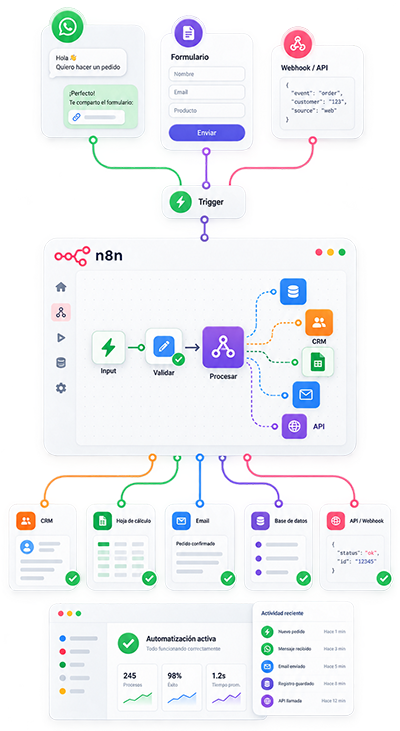
I design and implement custom n8n automations to connect applications, execute processes automatically, transform information, and coordinate different systems within a single workflow.
From simple tasks to processes involving multiple steps, decisions, APIs, databases, webhooks, and artificial intelligence.
Practical, controlled automation designed around how your business actually works.
Service Overview
What exactly do I do?
I analyze processes that currently require manual work and turn them into automated n8n workflows.
I can automate, among other things:
- Automatic form capture and processing
- Data synchronization between platforms
- Customer and lead registration and updates
- Email and notification automation
- Order, payment, and request processing
- Integration with CRMs, ERPs, and internal tools
- Connections with Google Sheets and databases
- Automatic report generation
- Scheduled task execution
- Data processing and transformation
- Automation using APIs and webhooks
- Workflows incorporating artificial intelligence
- Lead follow-up and classification processes
- Automatic alerts based on specific conditions
The goal is not to automate simply for the sake of automation.
It is to identify which tasks are truly worth eliminating, simplifying, or connecting so your operation becomes more efficient.
Why use n8n?
n8n makes it possible to build flexible automations that connect different systems without depending on a single closed platform.
The automations I implement can be:
- Custom-built, according to your business logic
- Scalable, allowing new processes to be added in the future
- Measurable, with execution and result tracking
- Controlled, with validations and error handling
- Integrable, through APIs, webhooks, and databases
- Modular, allowing parts of a workflow to be expanded or modified without rebuilding everything
This makes it possible to create processes that are far more advanced than a simple sequence of actions.
n8n Automation: Smart Workflows for Real Business Processes
A well-designed automation is not simply about connecting one application to another.
It means defining:
what should happen, when it should happen, what information is required, what decisions the system must make, and what happens when something goes wrong.
With n8n, I can build workflows that receive information, validate it, transform it, query other systems, execute actions, and automatically store the results.
Everything within an organized and controllable workflow.
What Type of Automations Do I Develop?
Operational Process Automation
- Automatic form processing
- Information registration across different systems
- Record creation and updates
- Repetitive administrative processes
- Automatic data validation
- Internal notifications
- File and document management
- Processes scheduled by time or date
Application Integration
- WordPress and WooCommerce
- Shopify
- Google Sheets
- Google Drive
- Gmail
- CRMs
- Messaging platforms
- Internal systems
- Databases
- Payment gateways
- Marketing tools
- External services through APIs
n8n works as an orchestration layer that allows different tools to work together within the same process.
Advanced Automations
- Workflows with multiple conditions
- Automatic information classification
- Different routes based on incoming data
- Batch processing
- Automatic retries
- Error handling
- Approval workflows
- Real-time webhooks
- Artificial intelligence automations
- Processes combining multiple APIs and services
Benefits of Automating Processes with n8n
Fewer Manual Tasks
Connected Information
Faster Processes
Greater Operational Control
Ready for Real-World Automation
APIs and External Services
n8n can connect to applications through existing integrations or directly through APIs.
I can work with:
- REST APIs
- Webhooks
- OAuth
- Access tokens
- API Key authentication
- External services
- Internal systems
- Custom applications
This makes it possible to integrate virtually any platform that provides a programmatic way to exchange information.
Webhooks and Real-Time Execution
A workflow can start immediately when an event occurs.
For example:
- a form is submitted
- a new lead comes in
- an order is placed
- a payment status changes
- a customer is registered
- a message arrives
- a system updates information
- an external event occurs
n8n receives that information and automatically executes the next steps defined in the process.
Scheduled Automations
I can also create processes that run automatically according to a defined schedule:
- Hourly
- Daily
- Weekly
- Monthly
- At specific times
- According to custom rules
This is useful for synchronization, reporting, checks, data maintenance, and recurring administrative processes.
Data, Databases, and Information Processing
n8n can act as an intermediary between different data sources.
I can create workflows to:
- Query databases
- Create or update records
- Validate information
- Transform data structures
- Remove duplicates
- Consolidate information from different sources
- Process large volumes of records
- Generate information for reports
- Keep systems synchronized
Depending on the project, workflows can connect to databases such as PostgreSQL, MySQL, and other compatible systems.
Artificial Intelligence Automation
n8n can also incorporate artificial intelligence models into business processes.
Some examples include:
- Classifying requests
- Analyzing messages
- Extracting information from text
- Generating preliminary responses
- Summarizing information
- Identifying intent
- Organizing leads
- Processing documents
- Generating structured content
- Making decisions within a workflow based on rules and context
Artificial intelligence is used as part of the process, not as a replacement for the entire system logic.
The goal is to combine automation, rules, data, and AI in a controlled way.
Workflows Designed for Production
An important automation must be able to operate reliably even when unexpected situations occur.
That is why I can incorporate:
Error Handling
Specific routes when an API fails, data is incomplete, or an external service does not respond correctly.
Controlled Retries
Processes that can retry specific operations without duplicating information or executing incorrect actions.
Data Validation
Checks before a workflow continues to prevent incorrect information from moving through the process.
Execution Logs
Information that makes it possible to review what happened during an automation and simplify troubleshooting.
Alerts
Notifications when an important error occurs or a condition requires human intervention.
Stable and Controlled Technical Development
Organized Workflows
I design workflows to be clear, structured, and understandable, avoiding unnecessary complexity.
Measurable Processes
Automations can record events, results, and errors to make monitoring easier.
Architecture Ready to Grow
A well-designed workflow should allow new features, integrations, or rules to be added without having to rebuild the entire system.

Why Work With Me?
I do not start with the tool.
I start with the process you need to improve.
Before building an automation, I analyze what currently happens, which tasks are repeated, which systems are involved, and where time is really being lost.
From there, I design the simplest and most reliable workflow capable of solving the problem.
My approach combines automation, APIs, databases, business logic, and systems integration.
Our Process
Analysis of the Current Process
I review the task you want to automate, the systems involved, and how the process currently works.
I identify:
- what starts the workflow
- what information comes in
- what decisions are required
- what actions must be executed
- where the information should be stored
- what situations could cause errors
The result is a clear definition of what actually needs to be automated.
Workflow Design
I define the architecture of the automation:
Initial trigger, Sequence of actions, Conditions, Integrations, Required data, Validations, Error handling, Expected result.
The goal is to build a workflow that is logical, maintainable, and easy to understand.
Development and Integration
I build the workflow in n8n and configure the necessary connections with APIs, applications, databases, and external services.
I implement the logic required for each part of the process to operate automatically.
Testing and Validation
I test different scenarios before moving the workflow into production.
I verify:
correct data, process routes, conditions, integrations, errors, retries, results, behavior in unexpected situations
The goal is to avoid automations that only work when everything goes perfectly.
Implementation, Documentation, and Support
Once the workflow has been validated, it is deployed into production.
Depending on the project, I can include:
- Basic documentation
- Explanation of how the workflow works
- Execution reviews
- Subsequent adjustments
- Maintenance
- Monitoring
- New feature implementation
Ongoing Support and Maintenance
Automations depend on platforms, APIs, and services that can change over time.
That is why I can also provide maintenance for existing workflows.
This can include:
- Execution reviews
- Error correction
- Integration updates
- Adjustments when an API changes
- Workflow optimization
- Credential reviews
- Improved error handling
- Addition of new actions
- Log analysis
- Performance adjustments
The goal is to ensure your automations continue operating reliably over time.
Metrics That Can Be Monitored
Depending on the workflow, it is possible to measure aspects such as:
- Number of executions
- Successful executions
- Errors
- Processing time
- Records processed
- Leads managed
- Messages sent
- Orders processed
- Synchronizations completed
- Retries
- Results from external actions
This makes it possible to identify problems and understand what each automation is actually doing.
Results You Can Expect
- Fewer repetitive tasks
- Less manual intervention
- Reduced errors
- Synchronized information
- Processes running automatically
- Faster operations
- Better traceability
- Systems working together
- More time for activities that genuinely require human intervention
What You Receive With My Service
✓ Process analysis
✓ Workflow design
✓ n8n development
✓ Integration with your systems
✓ API and webhook configuration when required
✓ Validations and error handling
✓ Testing before production
✓ Implementation
✓ Basic documentation
✓ Ongoing support according to the contracted scope
Common Problems I Can Solve
- Manually copying information between platforms
- Leads that need to be registered in multiple systems
- Forms that require manual processing
- Reports that must be repeatedly prepared
- Systems that do not share information
- Processes that depend on constantly checking email
- Notifications that must be sent manually
- Duplicate or outdated data
- Follow-ups that are forgotten
- Repetitive administrative tasks
- APIs that need to work together
- Existing automations that fail or have become difficult to maintain
Start Your n8n Automation Project
Do you have a repetitive process that should run automatically?
Tell me how it currently works.
We will review which tasks can be automated, which platforms need to be connected, and the most practical way to implement the process with n8n.
You do not need to know how to build the workflow.
You only need to explain what you currently do manually and what you would like to happen automatically.
📞 WhatsApp: +57 318 648-4818
n8n Automation for Companies and Businesses
I help companies and professionals automate processes with n8n, connect applications, integrate APIs, and create custom workflows that reduce manual work.
From small automations to business processes involving multiple systems, databases, webhooks, and artificial intelligence.
If you are looking for an n8n specialist to develop, improve, or maintain automations, I can help you turn manual processes into stable and scalable workflows.
Frequently Asked Questions
1. What is n8n?
n8n is an automation platform that allows applications, APIs, databases, and services to be connected in order to create processes that run automatically.
A workflow can receive information, process it, make decisions, and execute different actions without manual intervention.
2. What processes can be automated with n8n?
Processes such as lead capture, customer updates, form processing, report generation, notifications, data synchronization, order management, administrative tasks, and integration between different applications can be automated.
What can be automated depends mainly on the systems involved and the integration methods available.
3. Can n8n connect to any application?
n8n provides numerous integrations and can also connect to external systems through APIs and webhooks.
If a platform provides an API or another compatible integration mechanism, it can usually be incorporated into a workflow.
4. Can n8n work with WordPress and WooCommerce?
Yes.
Automations can be created for users, forms, orders, products, customers, inventory, notifications, and other WordPress or WooCommerce processes using their APIs, webhooks, and available tools.
5. Can n8n connect to Shopify?
Yes.
n8n can use Shopify APIs and webhooks to automate processes involving orders, customers, products, inventory, and other store operations.
6. Can n8n use artificial intelligence?
Yes.
A workflow can incorporate artificial intelligence services and models to analyze text, classify information, generate responses, extract data, summarize content, or participate in decision-making within an automated process.
7. Is it possible to automate WhatsApp with n8n?
Yes, provided that a compatible provider or API is used to manage WhatsApp.
n8n can receive events, process messages, and coordinate actions with other systems as part of an automation.
8. Can I use n8n if my company has its own internal systems?
Yes.
n8n is particularly useful when commercial tools need to be connected with internal applications, databases, or APIs developed specifically for a company.
9. Can I host n8n on my own server?
Yes.
n8n can be used as a managed service or installed on your own infrastructure, depending on the technical, control, and maintenance requirements of the project.
10. What happens if an automation fails?
A professional workflow can include error handling, validations, retries, logging, and alerts.
This makes it possible to detect failures and prevent an external issue from going unnoticed or unnecessarily affecting the rest of the process.
11. Can you review an existing n8n automation?
Yes.
I can analyze existing workflows to identify errors, unnecessary complexity, maintenance issues, unstable integrations, or opportunities for optimization.
12. How much does it cost to develop an n8n automation?
The cost depends on the number of systems involved, number of steps, APIs, rules, data volume, and workflow complexity.
A simple automation requires much less development than a process involving multiple integrations, databases, artificial intelligence, and business logic.
For that reason, each project is evaluated according to its actual scope.
13. How long does it take to develop an n8n workflow?
It depends on the complexity.
A simple automation can be developed in a few days, while processes involving multiple systems, rules, testing, and integrations may require several weeks.
Before starting, the scope and estimated timeline are defined.
14. Do I need technical knowledge to use the automations?
No.
The automation runs in the background.
When interaction is required, the goal is for you to continue working from the tools you already use normally, without needing to modify the workflow.
15. How do I know if my business needs n8n automation?
There is probably an automation opportunity if you currently:
- copy data between systems
- repeat the same tasks every day
- depend on spreadsheets to move information
- manually check whether a specific event has occurred
- prepare repetitive reports
- update multiple systems with the same data
- perform follow-ups manually
- use applications that should communicate with one another
In these situations, it is worth analyzing whether part of the process can run automatically.